MacOS Tahoe M5 Install Erlang 27+
- Install on MacOS Tahoe 26.1
- Install Erlang 27.3.4.6 with JIT compilation enabled for best performance
- Also install related tools like wxwidgets
Basic Software Installation
Install Xcode
Search for Xcode in the App Store and install it
Install xcode-select
xcode-select --install  # Click "Install" when the popup appears
sudo xcodebuild -license accept  # Accept the license agreement
- Check macOS system information and SDK path
xcrun --sdk macosx --show-sdk-path
sw_vers  # Check macOS version
Install brew
- Installation command
/usr/bin/ruby -e "$(curl -fsSL https://raw.githubusercontent.com/Homebrew/install/master/install)"
- Update operations
brew doctor # Check Homebrew status
brew update # Update formulas
Install Dependencies
brew install openssl
brew install libpng jpeg-turbo libtiff zlib  # Image processing dependencies
brew install pkg-config  # Help wxWidgets identify system library paths
brew install giflib pcre2 webp
Install wxwidgets
After multiple tests and resolving compilation issues with AGL, compat30, stc, opengl, webview, etc., choose to install wxWidgets-3.2.8.1 to enable Erlang WX functionality.
- wxWidgets - Install from source
curl -L https://github.com/wxWidgets/wxWidgets/releases/download/v3.2.8.1/wxWidgets-3.2.8.1.tar.bz2 -o wxWidgets-3.2.8.1.tar.bz2
tar -jxf wxWidgets-3.2.8.1.tar.bz2
cd wxWidgets-3.2.8.1
- Fix AGL issue by editing the configure file
vi configure

# Change OPENGL_LIBS="-framework OpenGL -framework AGL" to OPENGL_LIBS="-framework OpenGL"
# Save and exit
- Configure wxWidgets compilation options
./configure \
  --prefix=/usr/local/lib/wxwidgets \
  --with-cocoa \
  --with-opengl \
  --enable-unicode \
  --enable-shared \
  --enable-compat30 \
  --enable-stc \
  --with-libtiff=builtin \
  --with-libjpeg \
  --with-libpng=builtin \
  --disable-debug
- Compile wxWidgets
make -j$(sysctl -n hw.ncpu)
- Install
sudo make install
- Installation directory
ls /usr/local/lib/wxwidgets
- Add the installed wx-config to PATH
echo 'export PATH="/opt/homebrew/opt/wxwidgets/bin:$PATH"' >> ~/.zshrc
echo 'export PKG_CONFIG_PATH="/opt/homebrew/opt/wxwidgets/lib/pkgconfig:$PKG_CONFIG_PATH"' >> ~/.zshrc
source ~/.zshrc
Install Erlang
KERL_CONFIGURE_OPTIONS="--enable-jit --disable-hipe --enable-smp-support --enable-threads --enable-kernel-poll --enable-dynamic-ssl-lib --with-ssl=/opt/homebrew/opt/openssl@3 --without-odbc --enable-wx --with-wx-config=/usr/local/lib/wxwidgets/bin/wx-config" && kerl build 27.3.4.6 r27.3.4.6

Extracting source code for normal build...
Building (normal) Erlang/OTP 27.3.4.6 (r27.3.4.6); please wait...
Initializing (build) log file at /Users/caocc/.kerl/builds/r27.3.4.6/otp_build_27.3.4.6.log.
Attempting to use Homebrew OpenSSL from /opt/homebrew/opt/openssl@3.0...
WARNING: ... you may have to brew the expected version or otherwise use --with-ssl
APPLICATIONS DISABLED (See: /Users/caocc/.kerl/builds/r27.3.4.6/otp_build_27.3.4.6.log)
 * jinterface     : No Java compiler found
 * odbc           : ODBC library - link check failed

Erlang/OTP 27.3.4.6 (r27.3.4.6) has been successfully built.
Activate the installed Erlang using kerl.
- Test wx
erl
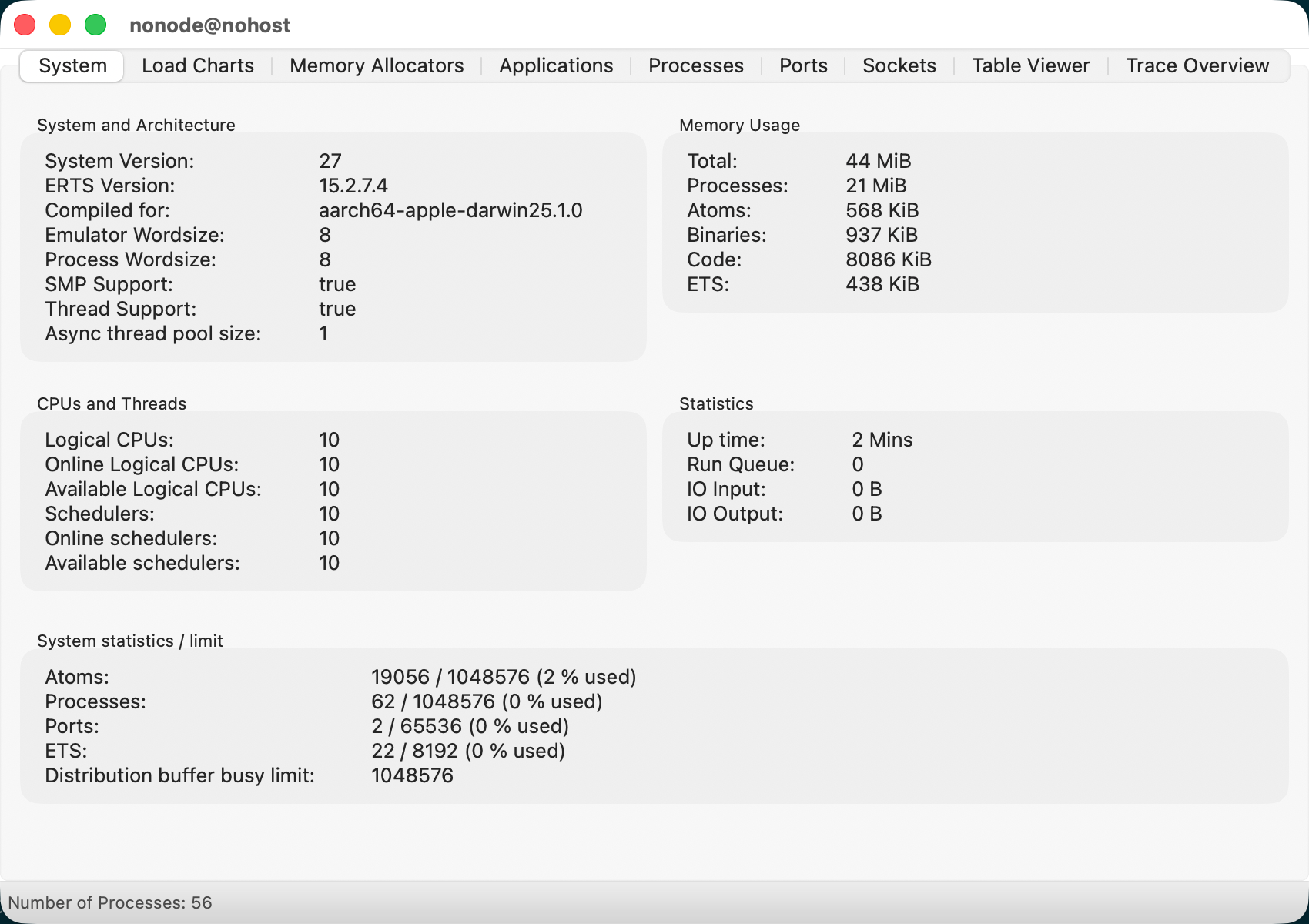
Erlang/OTP 27 [erts-15.2.7.4] [source] [64-bit] [smp:10:10] [ds:10:10:10] [async-threads:1] [jit]

Eshell V15.2.7.4 (press Ctrl+G to abort, type help(). for help)
1> observer:start().
ok
2>
BREAK: (a)bort (A)bort with dump (c)ontinue (p)roc info (i)nfo
       (l)oaded (v)ersion (k)ill (D)b-tables (d)istribution
Troubleshooting
- Erlang wx functionality cannot be compiled and used normally
APPLICATIONS INFORMATION (See: /Users/caocc/.kerl/builds/r27.3.4.6/otp_build_27.3.4.6.log)
 * wx             : wxWidgets was not compiled with --enable-compat30, wx will NOT be useable
inlines-hidden   ./src/common/modalhook.cpp
./src/common/imagtiff.cpp:37:14: fatal error: 'tiff.h' file not found
   37 |     #include "tiff.h"
      |              ^~~~~~~~ 1 error generated.
ld: framework 'AGL' not found

clang++: error: linker command failed with exit code 1 (use -v to see invocation)

make: *** [/Users/caocc/work/tmp/wxwidgets/wxWidgets-3.3.1/lib/libwx_osx_cocoau_gl-3.3.1.0.0.dylib] Error 1
Final Results
- Erlang 27.3.4.6 installed successfully

- wx functionality included